Let your AI agent check a fax test for you. Connect the Faxbeep MCP server, send a test fax or a scan to email, and your agent finds the result on Faxbeep and reads it. It is free, and you do not need an account or an API key.
MCP (Model Context Protocol) is a way to connect an AI agent, such as Claude, ChatGPT, Claude Code or Codex, to another service. The Faxbeep MCP server gives your agent the same test numbers and the same public test results as faxbeep.com.
Privacy note: Every test that Faxbeep receives is publicly visible for 30 days, with its pages. This includes a test that your agent finds for you. Do not send real documents.
Add the connector
The server address:
https://faxbeep.com/mcp
There is no sign-in, no API key and nothing to sign up for. If your app asks about authentication, choose "No sign in" or "None". If it asks for a transport, choose Streamable HTTP.
Claude (web and desktop)
- Open Customize, then Connectors.
- Click + Add, then Add custom connector.
- Name it "Faxbeep", enter
https://faxbeep.com/mcpand click Continue. - Under Authentication, choose No sign in. Click Add.
- In a chat, click +, then Connectors, and turn on Faxbeep.
On the Free plan, you can add one custom connector. On a Team or Enterprise plan, an owner adds the connector in Organization settings, then each member connects it.
ChatGPT
Custom connectors in ChatGPT need Developer mode, which is on some plans only. Turn on Developer mode in the settings, then create a connector with the address https://faxbeep.com/mcp and no authentication. The menu names change often, so check the ChatGPT help pages.
Claude Code
claude mcp add --transport http faxbeep https://faxbeep.com/mcp
Codex
codex mcp add faxbeep --url https://faxbeep.com/mcp
Cursor
Add this to .cursor/mcp.json in your project, or to ~/.cursor/mcp.json for all projects:
{
  "mcpServers": {
    "faxbeep": {
      "url": "https://faxbeep.com/mcp"
    }
  }
}
Gemini CLI
Add this to ~/.gemini/settings.json. Gemini CLI uses httpUrl for a Streamable HTTP server:
{
  "mcpServers": {
    "faxbeep": {
      "httpUrl": "https://faxbeep.com/mcp"
    }
  }
}
What your agent can do
The server has three tools. All three only read: they cannot send, change or remove anything.
| Tool | What it does |
|---|---|
get_test_numbers |
Gives the test fax numbers, the test email addresses, the limits, and the server time to search from |
list_test_faxes |
Lists the test faxes and scans that Faxbeep received, newest first. It can filter by time, sender and page count |
get_test_fax |
Reads one fax again by its ID (for example fax_1a2b3c4d) or by the link to its page |
Each result has the sender (masked, as on our site), the time it arrived, the page count, a link to the PDF and a link to the page of the fax on faxbeep.com.
These are the test numbers that your agent gets:
Fax Test Numbers
Send a test fax or scan to one of these destinations.
Test your printer’s email sending
Send a page using Scan to Email or Internet Fax (I-Fax), then check the result here. No phone line needed.
How a test with your agent works
Your agent does the searching. You send the test.

1. Ask for a test number
Your agent calls get_test_numbers. It notes the server time, so that it searches from the moment before you send.

2. Send the test
Send a fax to one of the numbers from your fax machine or fax service. Or send a scan by email to one of the test addresses.

3. Your agent looks for it
Your agent calls list_test_faxes about every 30 seconds. A test usually appears within a minute. A few take longer.

4. Check the page
Your agent gives you the link to the page of the fax. Open it and check that it is your fax.
Things to ask your agent
- "Give me a test fax number in the US."
- "I am sending a test fax now. Tell me when it arrives."
- "Did my fax from +1 972 555 0100 arrive in the last 10 minutes?"
- "How many pages did fax_1a2b3c4d have?"
- "My copier sent a scan to the test address. Did it arrive, and how big is the file?"
What it is not
- It does not send faxes. Faxbeep only receives. To send a test without a fax machine, you can use a fax sending service, such as PayPerFax.
- It does not keep anything private. Every test is public on faxbeep.com for 30 days, then it is deleted. Your agent sees the same public list as everyone else.
- It cannot prove that a fax is yours. Other people send tests at the same time. A match by time, sender or page count narrows the list. Your agent shows you the link to the page so that you can check it.
Try it with the sample fax
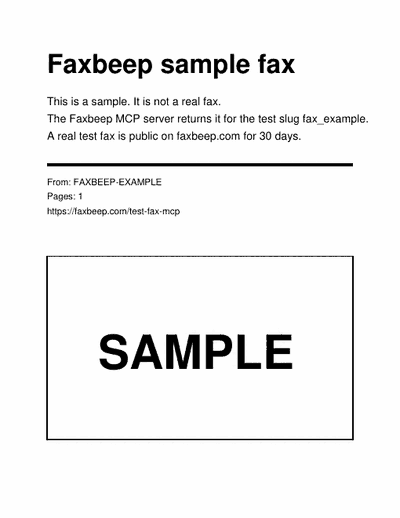
To check that the connector works without sending a test, ask your agent to get the fax fax_example. It is a fixed sample, not a real fax, and it does not change. It has 1 page from the sender FAXBEEP-EXAMPLE. Its date is in the past, so it is in a list only when your agent asks for the sender FAXBEEP-EXAMPLE.
For developers
- MCP server docs: each tool, its input, its result and its errors.
- Developer docs: how to find your fax, and how to test in CI.
- API reference: the developer API at
https://faxbeep.com/api/faxes. It gives the same fax objects as the MCP server.
FAQ: Test Fax MCP Server
Is the Faxbeep MCP server free?
Yes. It is free, and you do not need an account, an API key or a sign-in.
Which AI agents can use it?
Any app that lets you add a remote MCP server: Claude, Claude Code, Codex, Cursor and Gemini CLI, and ChatGPT in Developer mode. If your app cannot add one, you can still send a test and find it on our home page.
Can my agent send a fax?
No. Faxbeep only receives faxes. You send the test from your fax machine, your fax service or your copier.
Can other people see my test?
Yes. Every test is publicly visible for 30 days. If you need it removed sooner, click "Request removal" on its page. Do not send real documents.
Does it test scan to email too?
Yes. A scan that you send to one of the test addresses appears in the same list as a fax, marked as received by email. See the scan to email test.
Can my agent remove a fax?
No. Removal needs a confirmation by email, so you request it on the page of the fax.